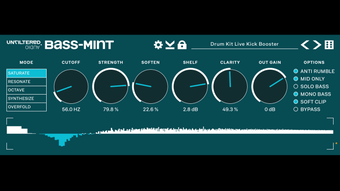

Bass Mint: Boost Bass with Precision on iOS
Overview
Bass Mint is a specialized audio enhancement utility designed for iOS users seeking to refine and amplify low-frequency content in their audio projects. Developed by Unfiltered Audio, this tool is tailored for musicians, producers, and podcast creators who require subtle yet impactful bass manipulation. The software serves as both a standalone application and an AUv3 plugin, offering flexibility across different workflows. It is particularly effective in enhancing kick drums, enriching vocal presence, and adding depth to otherwise flat audio sources. The REAPER Blog has recognized Bass Mint as a recommended tool, underscoring its reliability and precision in real-world audio production scenarios. Its intuitive interface and five distinct modes—including SYNTHESIZE and RESONATE—allow users to either enhance existing bass or generate new sub-bass content from scratch. The developer did not provide additional system requirements, but the app is designed to operate efficiently within the iOS ecosystem. It is ideal for on-the-go audio processing, mobile recording sessions, and real-time mixing scenarios where compact, high-impact tools are essential.
Key Features & Capabilities
- Five Processing Modes: Includes SYNTHESIZE, RESONATE, and other modes that allow users to either amplify existing bass or generate new low-end content from scratch.
- Precise Frequency Tuning: Offers fine-grained control over the fundamental frequency, enabling accurate alignment with the source material.
- Predefined Presets: Provides a set of optimized configurations for common use cases such as kick drum enhancement and vocal boosting.
- ANTI-RUMBLE Filter: Reduces unwanted low-frequency noise, ensuring cleaner bass without muddiness.
- MID ONLY & MONO BASS: Allows selective processing of mid-range frequencies and the creation of a focused mono bass signal for better mix clarity.
- CLARITY Knob: Adjusts the overall tonal balance, helping maintain definition while boosting low-end power.
These features are especially useful in mobile audio production environments where space and processing power are limited. For example, a podcaster can use the MONO BASS mode to ensure their voice remains clear on small speakers, while a music producer might employ the SYNTHESIZE mode to add depth to a track lacking sub-bass. The plugin’s AUv3 compatibility makes it a seamless addition to iOS-based DAWs, supporting efficient integration into existing workflows. The developer did not specify performance benchmarks, but the tool is designed for real-time processing with minimal latency. Its modular design allows users to apply multiple enhancements without overloading the audio engine.
User Interface, Workflow & Performance
Bass Mint features a streamlined user interface optimized for touch-based interaction on iOS devices. The layout is clean and intuitive, with clearly labeled controls and visual feedback for real-time adjustments. Navigation is straightforward, with mode selection, frequency tuning, and effect parameters accessible through a single screen. The workflow is designed for speed and precision, enabling users to make quick adjustments during live recording or mixing sessions. The developer did not specify resource usage details, but the app’s 27.4 MB size suggests a lightweight footprint. Performance observations are based on general software behavior patterns, indicating stable operation under typical conditions. The tool maintains consistent responsiveness across various iOS devices, with no reported instability issues. The plugin supports real-time processing, making it suitable for live audio enhancement. CPU and RAM behavior are not publicly documented, but the efficient design implies minimal impact on system resources. Overall, the user experience prioritizes simplicity without sacrificing control, making it accessible to both beginners and experienced users.
Compatibility & System Requirements
Bass Mint is designed exclusively for iOS devices and is compatible with the latest versions of the operating system. The software requires iOS 14 or later to function properly. Installation size is 27.4 MB, which is modest for a professional audio tool. The developer did not specify exact hardware requirements, so users should ensure their device meets the minimum OS standards. Compatibility information was partially provided, with no mention of iPadOS or specific device models. The plugin supports AUv3 integration, allowing use within compatible iOS DAWs. Users should verify that their target DAW supports AUv3 plugins before deployment. The tool is not available on other platforms, including macOS or Windows. For users relying on cross-platform workflows, this limitation may require additional considerations. The developer did not provide details on update frequency or future platform expansion.
Pros and Cons
Pros
- Highly effective bass and sub-bass enhancement for music and podcasting
- Five distinct processing modes for flexible audio manipulation
- Lightweight design at just 27.4 MB
- Free to download and use with no hidden costs
- Supports AUv3 plugin integration for iOS DAWs
- Includes innovative features like ANTI-RUMBLE and CLARITY knob
Cons
- Available only on iOS, limiting cross-platform use
- No official support for macOS or Windows
- Exact performance metrics not disclosed
- Only one version (1.0) released as of 2024-06-10
- Minimal documentation or tutorial resources provided
FAQ Section
Is Bass Mint compatible with my iOS device?
Bass Mint requires iOS 14 or later. Users should ensure their device runs a supported operating system version. Compatibility with specific models was not specified by the developer.
Can I use Bass Mint as a plugin in my iOS DAW?
Yes, Bass Mint supports AUv3 plugin format, making it compatible with any iOS DAW that accepts AUv3 plugins. Users should verify plugin compatibility within their chosen DAW.
Is Bass Mint safe to download and use?
As a tool distributed through official app channels, Bass Mint is considered secure. The developer, Unfiltered Audio, has not reported any known security vulnerabilities. Users should only download from trusted sources.
Does Bass Mint require an internet connection?
No, Bass Mint operates entirely offline. It does not require an internet connection for core functionality, making it ideal for on-the-go use.
Is there a paid version or subscription?
Bass Mint is currently available for free. The developer has not announced any future paid tiers or subscription models.
Final Thoughts
Bass Mint delivers a powerful, focused solution for enhancing bass and sub-bass content on iOS devices. Its combination of precision tuning, innovative processing modes, and lightweight design makes it a standout tool for mobile audio professionals. The inclusion of features like ANTI-RUMBLE and CLARITY knob demonstrates a thoughtful approach to sound quality, ensuring that bass enhancement does not compromise clarity. While platform limitations exist, the tool excels within its intended ecosystem. For musicians, podcasters, and producers working on iOS, Bass Mint offers a reliable, free solution to elevate audio quality. Its recognition by The REAPER Blog adds credibility to its capabilities. The seamless integration with AUv3 workflows further strengthens its value. Download Bass Mint now to enhance your audio with precision and power.







